The Modern Solution: Nodal VPN
This article explains the technical challenges of adding 2-Factor Authentication (2FA) to a standard WireGuard setup.
The simple answer? Don’t do it yourself.
We built Nodal VPN to solve this problem. It’s a cloud-orchestrated platform that adds 2FA, Active Directory integration, and full user management to WireGuard in minutes, not days. Your data stays on your own network, and you get a “zero-config” client.
Set up WireGuard with 2FA today. Learn More About Nodal VPN
Why 2FA for Your VPN is No Longer Optional
Securing a VPN with 2-factor Authentication (2FA) provides a critical, additional layer of security to protect your online activities and data. Here are some reasons why 2FA is essential for any modern VPN:
Prevents Unauthorized Access: 2FA ensures that only authorized users can access your VPN, as it requires a second layer of Authentication in addition to a username and password. It means that even if a hacker somehow gains access to a user’s login credentials, they won’t be able to access your VPN without the additional authentication step.
Protects Against Password Attacks: Password attacks such as brute-force attacks, dictionary attacks, and phishing attacks are trivial to perform. With 2FA, even if a hacker gets hold of a password, they still won’t be able to access your VPN account without the additional authentication factor, which typically involves a physical token or a biometric factor.
Enhances Security for Remote Access: With a modern remote workforce, 2FA is the baseline for preventing unauthorized access and protecting sensitive data. With 2FA, you can be sure that only authorized employees can access the company’s network from remote locations.
Compliance with Regulations: Many industries, such as healthcare and finance, have regulations (like HIPAA and PCI) that require strong security measures for remote access to networks and data. Using 2FA for your VPN is a simple and effective way to ensure compliance and protect sensitive data.
The Core Problem: Configuring WireGuard with 2-Factor Authentication
This all leads to one major question: How do you configure WireGuard with 2FA?
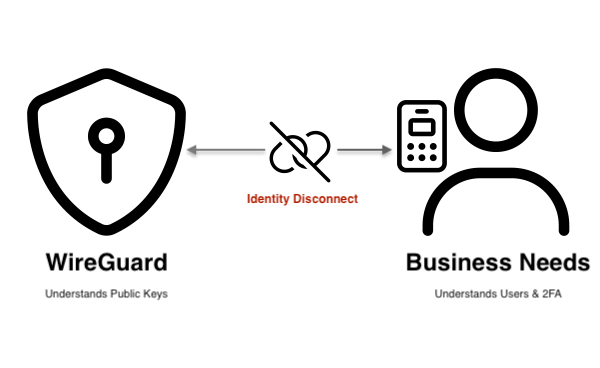
The challenge is that WireGuard, by design, does not have built-in support for 2FA. It doesn’t understand “users” or “passwords”; it only understands public keys.
This means IT administrators are forced to manually bolt on external tools. This typically involves a complex and brittle process: configuring your VPN server to work with an external RADIUS server, plumbing that into an identity provider (like Active Directory), and then trying to force the WireGuard client to trigger an authentication.
This creates a system that is difficult to manage, scale, and audit. Even worse, it often still relies on manually distributing config files, which is a security and management nightmare as your team grows.
The Solution: Nodal VPN – WireGuard with Built-in Identity
Nodal VPN is our next-generation secure access platform and the successor to our long-trusted LogonBox VPN. It was built from the ground up to solve the 2FA and identity problem.
Nodal VPN is a modern hybrid platform. It separates the control plane (for user management, 2FA, and policy) into a simple cloud dashboard, while the data plane (your actual network traffic) stays on your own secure, on-premise nodes. Your data never traverses our servers.
Here’s how Nodal VPN solves the 2FA problem:
Native 2FA & AD Integration: Nodal VPN integrates directly with Active Directory and a full suite of 2FA factors (Google Authenticator, YubiKey, Duo, etc.) out of the box. No RADIUS servers, no complex scripting.
Zero-Config Client: Nodal automatically creates and distributes secure profiles to your users. This completely frees administrators from the nightmare of creating, distributing, and managing static WireGuard config files.
Future-Proof Platform: The move to this new framework allows us to rapidly add more value-added features over the coming months, ensuring your access solution is always evolving.
Full On-Premise Option: For organizations with strict data-residency policies, a full Enterprise Edition is available for a complete on-premise installation, giving you total control over all components.
Instead of spending days trying to bolt 2FA onto a system that wasn’t designed for it, you can deploy Nodal VPN and have a fully secure, 2FA-protected WireGuard network running in under an hour.